- Gunnar Leymann
- 20 Jun, 2026
Column-Level Lineage in Microsoft Fabric Spark Notebooks
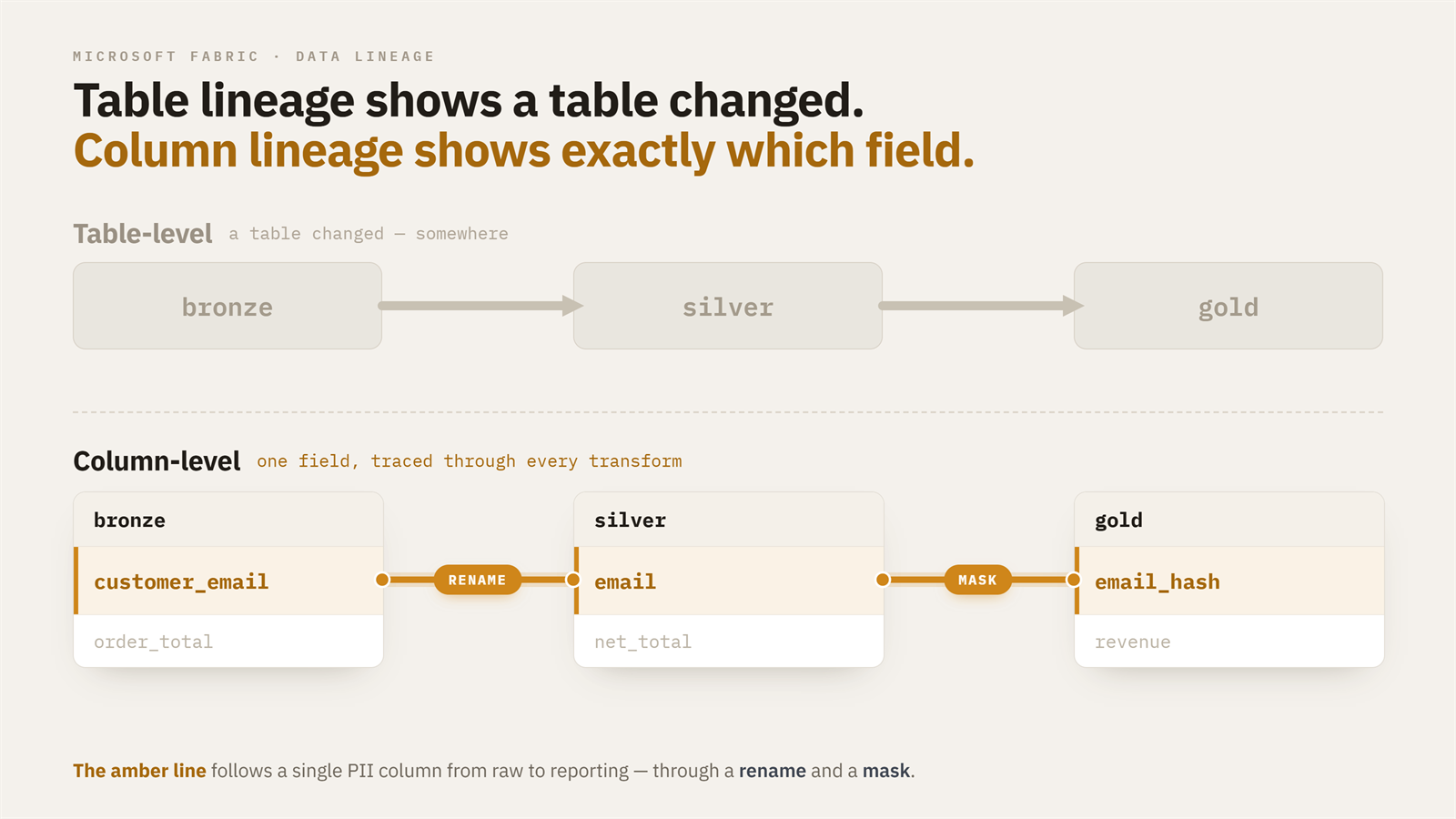
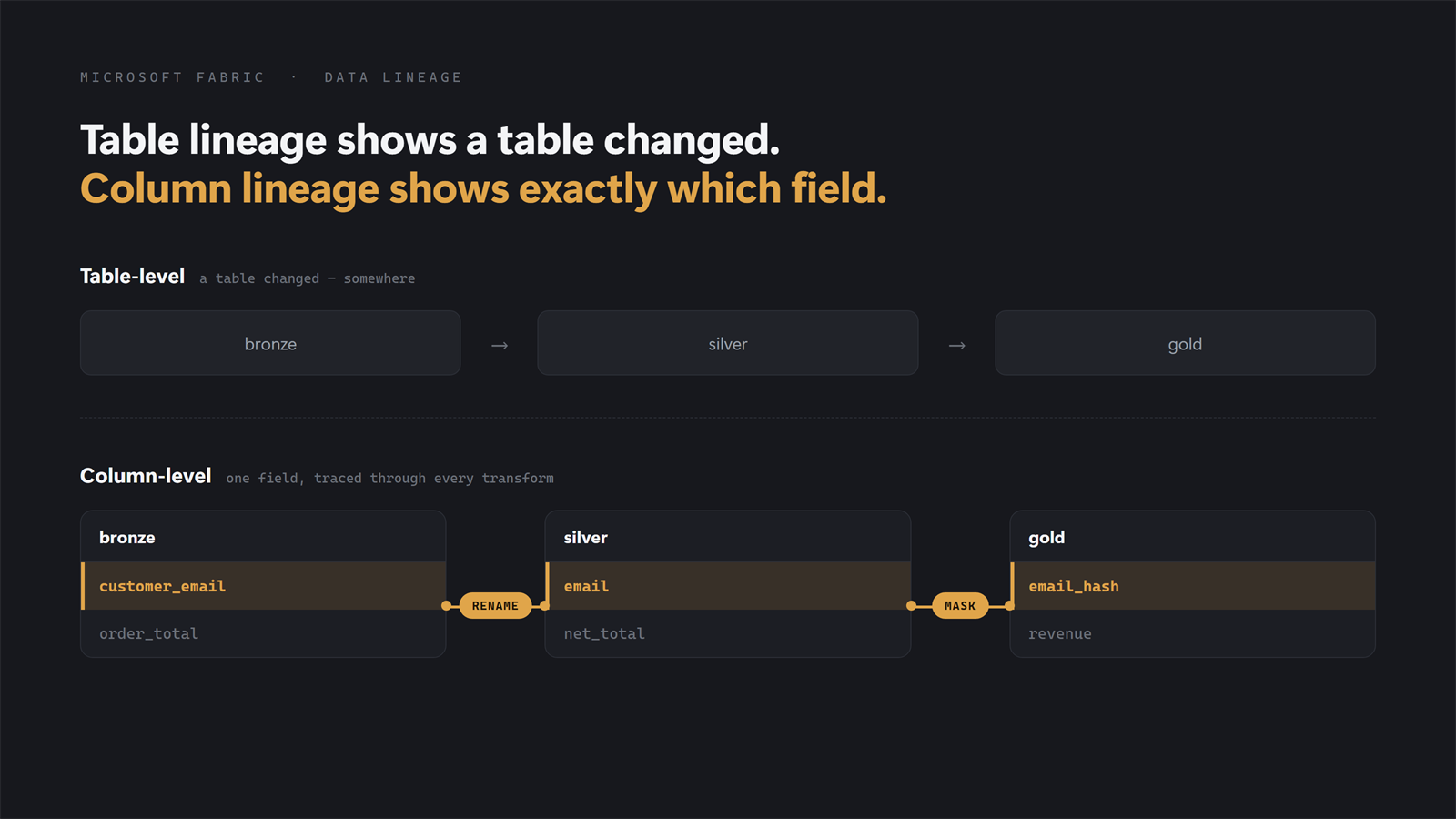
Fabric's lineage view stops right where the interesting questions start. It shows you which notebook feeds which dataset and draws the arrows between workspace items, then leaves you there. Ask anything about what happens inside a table and Fabric nudges you toward Materialized Lake Views or dbt, which is an odd thing to suggest when your platform already runs on Spark jobs and notebooks. So you do the obvious thing: write functions that scan the DDL and rebuild table-level lineage yourself. It works. But the map goes quiet the moment a question lives inside a table, and that is where most of them live:A field in a gold metric looks wrong. Table-level lineage hands you the full chain of tables and wishes you luck. Column-level lineage points at the one upstream column wired to that metric. Someone asks where customer_email ends up. You tagged it PII in bronze; table-level only confirms the bronze table is "used somewhere." Column-level lineage follows the column through every rename and concatenation downstream, so you know your actual masking surface. You want to drop a column nobody seems to use. Column-level lineage proves nothing downstream reads it, and the deprecation goes from risky to routine.In each case the unit of the question is the column. And this isn't only a governance asset: point an agent at a large platform without it and watch its context window fill with noise. Reliable column-level lineage is part of the context that makes agentic development on your platform more reliable. OpenLineage gives you exactly this, and it already ships in the Fabric Spark runtime. It's an open standard for emitting lineage events from data engines (openlineage.io) via a JVM listener on the Spark driver. Flip a few environment properties and every notebook starts emitting column-level lineage (source columns, transformation type, PII/masking signal, join and filter keys) as JSON on every create, append, merge, or overwrite. Producing the events is the easy part. The catch is getting them somewhere you can query without standing up a whole data pipeline just for that. There are three ways to do it, and they trade engineering effort against robustness quite differently. I'll build up to the one I actually shipped.Credit where due: the Fabric + OpenLineage combination was explored in depth by Raki Rahman, including this page that visualizes OpenLineage JSONL. Much of what follows stands on that work.Option 1: The full pipeline (robust, but a project of its own) The textbook answer, and the one Microsoft's Purview ADB Lineage Solution Accelerator is built around: point OpenLineage's HTTP transport at an Azure Function, buffer through Event Hub, parse with a second Function, land in Delta. Spark notebook → Azure Function (HTTP, <100ms 200) → Event Hub (durable buffer) → Azure Function (parse/dedupe/normalize) → ADLS Gen2 → Fabric LakehouseAnd it works well: no concurrency window, platform-agnostic plumbing, near real-time observability, and an easy fan-out to Marquez or Purview. It's also a real system, with external resources at around 20–50 €/month, plus the bicep/terraform, CI/CD, and monitoring that are easy to forget when you're just sketching the diagram. Reach for this when concurrency is real. Not "many jobs running", but many jobs emitting a write event in the same second, which happens on large platforms under certain orchestration and matters most when you need lineage in near real-time. Option 2: The file transport (one line, one big caveat) At the other extreme, OpenLineage can write events straight into the default Lakehouse attached to your notebook. One config change, zero infrastructure: spark.openlineage.transport.type = fileIt does not look like a proper solution, and for good reason. You get almost no control over the output: a fixed filename format (lineage_Y_minute_day_hour_month), no concurrent-append support (two apps closing in the same second, and one event is lost), and files that crowd your Lakehouse. For a mid-sized platform with manageable concurrency, where you want lineage as a governance asset rather than real-time observability, that's often an acceptable trade. Pair it with a harness that parses the files on a schedule into snapshot tables and you get real value at a fraction of the engineering cost. But the same-second data loss kept nagging me, which is why I built the next option. Option 3: A custom OneLake transport (Fabric-native, concurrency-safe) The file transport has the right idea (write to OneLake, skip the infrastructure) but one real flaw (it drops events under concurrency). So I wrote a small OpenLineage transport that keeps the idea and fixes the flaw. It's a JAR you attach to the Fabric Environment, and it writes lineage straight into OneLake, asynchronously and in batches, using the notebook session's own identity, with no Event Hub, no Functions, and no secrets in config. The concurrency problem is solved the same way the naming always solved it: every file carries an epoch timestamp plus a UUID, so two apps flushing in the same millisecond can't collide. What's new is how events reach the file. The listener thread never touches I/O: emit() only serializes the event and offers it to a bounded in-memory queue, so OneLake latency can't back up Spark's listener bus no matter how slow storage gets: private void enqueue(Object event) { if (!running.get()) return; try { String json = OpenLineageClientUtils.toJson(event); if (!queue.offer(json)) { // queue full -> drop, never block long d = dropped.incrementAndGet(); if (d == 1 || d % 100 == 0) { LOG.warning("OneLakeTransport queue full; dropped " + d + " events so far"); } } } catch (Exception e) { LOG.log(Level.WARNING, "OneLakeTransport failed to serialize lineage event", e); } }A single daemon thread drains the queue into NDJSON batch files, one file per batch, flushed when the first of these hits: batchSize events (default 50) or flushIntervalSeconds (default 30): private void writeBatch(List<String> batch) { try { String day = LocalDate.now(ZoneOffset.UTC).format(DAY); String name = System.currentTimeMillis() + "-" + UUID.randomUUID() + "-" + batch.size() + "events.ndjson"; Path path = new Path(baseUri + "/" + folder + "/dt=" + day + "/" + name); try (FSDataOutputStream out = fileSystem().create(path, false)) { for (String json : batch) { out.write(json.getBytes(StandardCharsets.UTF_8)); out.write('\n'); } } } catch (Exception e) { LOG.log(Level.WARNING, "OneLakeTransport failed to write batch", e); } }The piece that makes this safe at shutdown is close(), which the OpenLineage client calls at application end. It stops the flusher, drains whatever is still queued, and writes it, so the terminal COMPLETE/FAIL events always land. Two design choices are worth calling out. Auth is inherited, not configured: the transport pulls the Hadoop configuration off the active SparkSession, which in Fabric already carries the OneLake token providers for the session identity, so there are no credentials to manage. And lineage can never fail or block the job: serialization errors are logged and dropped, a full queue drops-and-counts rather than blocking, and no exception ever propagates back to Spark. OpenLineage discovers the transport through a standard ServiceLoader, so registration is just a builder plus one line in META-INF/services: public final class OneLakeTransportBuilder implements TransportBuilder { @Override public String getType() { return "onelake"; } @Override public TransportConfig getConfig() { return new OneLakeTransportConfig(); } @Override public Transport build(TransportConfig config) { return new OneLakeTransport((OneLakeTransportConfig) config); } }Once the JAR is attached, turning it on is pure config, the same shape as any other transport: spark.openlineage.transport.type = onelake spark.openlineage.transport.workspace = <workspace name or GUID> spark.openlineage.transport.lakehouse = <"MyLakehouse.Lakehouse" or item GUID> spark.openlineage.transport.folder = lineage # optional, default "lineage" spark.openlineage.transport.batchSize = 50 # optional, events per file spark.openlineage.transport.flushIntervalSeconds = 30 # optional spark.openlineage.transport.queueCapacity = 5000 # optional, drop beyond thisEvents land partitioned by day at Files/{folder}/dt={yyyy-MM-dd}/ as NDJSON batch files, ready to be read by a Spark job or shortcut into a table. The trade-offs. You're accepting at-most-once delivery. A batch sits in memory for up to the flush interval, so a hard driver kill (OOM, capacity eviction) loses whatever is buffered. Normal completion and even ordinary job failure are fine, because the listener still fires and close() drains; only ungraceful JVM death loses events, and the loss is bounded by flushIntervalSeconds, so tune it down if that bound matters. Backpressure is drop, not block: if OneLake is unreachable long enough to fill the queue, events are dropped and counted in the driver log. That's the correct call for lineage, but it's another silent-gap source, which is why you reconcile the events you land against your job history rather than trusting the folder to be complete. In exchange, batching mostly dissolves the small-files problem the earlier one-file-per-event design would have caused: a 50-event file replaces 50 writes, a short notebook run produces a single file at close, and file pressure drops by roughly an order of magnitude. You still want retention and compaction, just far less urgently. You also own a JAR: build it, version it, attach it. And note the auth fallback: if the transport can't find an active session, it drops to a bare Hadoop config with no OneLake credentials, and those writes fail silently. For lineage-as-governance on a mid-to-large platform, I've found the trade very much worth it.Full source for the transport is three small classes (OneLakeTransport, OneLakeTransportBuilder, OneLakeTransportConfig) plus the META-INF/services registration.So which one? If you have genuinely concurrent emission and need real-time, build the pipeline (Option 1). If you're on a modest platform and just want lineage in your Lakehouse today, the file transport (Option 2) is a fine first step. Everywhere in between, which in my experience is most Fabric platforms, the custom transport (Option 3) hits the middle: the config-simplicity of the file approach with the concurrency-safety of the pipeline, and nothing external to run. The rest of this post is the reference material: what the events actually contain, how to configure the listener, the full pipeline architecture, and the limitations you'll hit.The detail Configuring the listener Setup is not difficult. Create a Fabric Environment, change its Spark configuration, and publish: spark.extraListeners = io.openlineage.spark.agent.OpenLineageSparkListener spark.openlineage.namespace = <your-workspace-or-env-name> spark.openlineage.columnLineage.datasetLineageEnabled = true spark.openlineage.facets.spark.logicalPlan.disabled = true spark.openlineage.facets.debug.disabled = true…then add whichever transport block you chose above.The Spark integration ships pre-installed in the runtime (3.5.5.5.4.20260403.6 contains OpenLineage 1.26.0). Runtime 2.0 also shows OpenLineage pre-installed and supports Spark 4.x natively. What OpenLineage captures per column For every column written to storage, OpenLineage records which source columns it came from, what kind of transformation produced it (identity, calculation, aggregation), whether that transformation involved masking (a PII signal), and which other columns influenced row filtering, joins, or grouping (called indirect lineage). Each event has three top-level objects:Run: a unique execution instance. UUID, start/complete timestamps, and a parent reference if launched by another run. Job: what was executed. A name, a namespace, and zero or more facets describing its properties. Dataset: what was read or written. Identified by namespace + name, with facets for schema, statistics, etc.A single column's lineage entry looks like this: { "target_column_name": { "inputFields": [ { "namespace": "abfss://...@onelake.dfs.fabric.microsoft.com", "name": "/3eb04867-.../Tables/data_source/application_entity", "field": "source_column_name", "transformations": [ {"type": "DIRECT", "subtype": "IDENTITY", "masking": false} ] } ] } }Transformation taxonomy The type information is rich:DIRECT / IDENTITY: passed through unchanged (rename, projection). DIRECT / TRANSFORMATION: computed from the source (cast, arithmetic, string ops). DIRECT / AGGREGATION: sum, avg, count, etc. of the source. INDIRECT / FILTER: the source column was in a WHERE clause; it affected which rows survived, not their values. INDIRECT / JOIN: the source column was a join key. INDIRECT / GROUP_BY: the source column was a grouping key. INDIRECT / CONDITIONAL: the source column appeared in a CASE/IF predicate. masking: boolean, set true for known hashing/anonymization functions. Maps directly to PII tracking.Other keys worth knowingschema: column names and Spark types. Sometimes populated, sometimes not; don't rely on it. outputStatistics: row counts written. Useful for "did the job actually do anything" checks. storage: file format, partitioning. Mostly informational. spark_properties: every Spark config the app launched with. Captures the notebook name (spark.synapse.context.notebookname) and app ID. parent: points at a parent run if the job was launched by another OpenLineage-aware run.The whole protocol is event-based: emitters send START and COMPLETE (or FAIL) events per run. The "lineage graph" is something a consumer constructs by linking many events together. The limitations (all three options share these) OpenLineage's Spark integration reads the logical plan of SQL and DataFrame operations, so anything not in that plan is dark to it:UDFs are opaque. df.withColumn("x", custom_python_udf("a", "b")) shows x deriving from a and b, but the subtype stays vague (usually TRANSFORMATION, no description) because the listener can't see inside the UDF. RDD operations are darker still; enrichment via REST calls is missed entirely. Config must live at the Environment level. Setting OpenLineage properties inside a notebook cell does nothing, since the listener is already instantiated by the time the cell runs. That rules out spark.openlineage.run.tags (we wanted to stamp runs with pipeline IDs from notebook code, and couldn't). It also means roughly 2 minutes of extra queue time per ETL job, from the pool cold start. Delta MERGE reports empty top-level inputs. A MERGE INTO emits an event where inputs: [] is literally empty; the real source paths sit nested inside columnLineage.fields[].inputFields[].name. Walk event.inputs for sources and you miss every MERGE. runMultiple collapses attribution. When notebook A runs runMultiple([notebook_B, notebook_C]), all three share one Spark application and driver, so every event from B and C carries A's name in spark.synapse.context.notebookname. For per-notebook attribution, derive it from the output dataset paths, not the notebook name. Table names come from the path. A sensible naming convention plus a metadata table to match against are what let you identify which entity an event belongs to and stitch events into a graph.Is this cool? I think it is. Once the events are landing reliably in your Lakehouse (and with the custom transport, that "reliably" comes cheap), you can build entirely new data products on top of them: governance, agentic development, data quality. I've wired this into a workflow that partially automates the tedious work of generating and maintaining data contracts, producing full column lineage from Bronze to Platinum (semantic models) as .yml contracts. That's the subject of a future post.